(A personal story about something surprisingly life-changing)
When I was in fifth grade (in Germany, that’s around age 11), my parents put me in a 10-finger typing course. Their reasoning? The classic, “It will be valuable for your future”—a phrase I heard about ten times a day regarding everything from long-form math to eating my vegetables.
But why not, I thought. So every week I sat down at some old PCs running Windows XP, typing words like “das”, “der”, “wer” against a timer. It was kind of fun… but also kind of boring. And honestly, typing with two or three fingers while looking at the keyboard was getting the job done, too. So why switch to some “proper” 10-finger system that cost me two hours of free time every week?
Years later, I’ve realized my parents were right. In a world that moves faster than ever, your typing speed isn’t just a “nice-to-have” skill—it is the interface between your mind and the digital world.
1. The Bottleneck Effect
We are currently living through an AI revolution. We have tools that can generate code, write essays, and solve complex problems in seconds. But here is the catch: The computer can only go as fast as you can tell it what to do.
Think of your brain like a high-speed fiber-optic cable and the computer like a super-processor. The keyboard is the copper wire connecting them. If you can only type 30 words per minute (WPM), it doesn’t matter if you’re using the world’s most powerful AI—you are the bottleneck.
Speed isn’t just about finishing work faster; it’s about “buying back” your time. If you save just 10 minutes a day by typing more efficiently, you gain over 60 hours a year. That’s a full week of vacation earned just by moving your fingers better.
2. Protecting the “Flow State”
Have you ever had a brilliant idea, only to have it vanish because you got distracted by looking down at your hands to find the “M” key?
When you use the proper 10-finger method, typing moves into your muscle memory. It becomes “autopilot.” This reduces your cognitive load—instead of your brain focusing on how to type, it can focus entirely on what you are creating. This is the “flow state,” where the barrier between your thoughts and the screen disappears.
3. Why ‘Fast Enough’ Isn’t Fast Enough
You might think, “I’m actually quite fast with my six-finger hybrid style.” And you might be right! Many people are. But there is a hidden cost to the “hunt-and-peck” method: Stamina and Ergonomics.
- The Sight Cost: If you have to look at the keys, you are constantly shifting your focus and straining your neck.
- The Fatigue Factor: 10-finger typing allows your hands to rest in a neutral position. You can sit back, relax, and watch the words appear on the screen as if by magic.
4. Why Dictation Isn’t a Total Cure
With the rise of “Voice-to-Text” tools like VoiceInk, you might wonder if we need keyboards at all. While these apps are incredible for capturing raw thoughts, writing and speaking are two very different mental processes.
- Preprocessing: When you write, your brain “pre-edits” the information. Written thoughts are generally more structured and concise than the “data dump” of a voice recording.
- The Environment Problem: Try dictating a sensitive email or a line of code in a crowded cafe, a quiet library, or a busy office. It’s either socially awkward or impossible. The keyboard remains the only private, silent, and universal interface we have.
How Fast Are You, Really?
Most people think they are fast until they see the numbers. In the professional world, a speed of 60 to 80 WPM is considered the “sweet spot” for true productivity.
I’ve built a tool right here on this page to help you find your baseline. No proessure—it’s just a way to see if your fingers are keeping up with your brain.
The Challenge: Take 30 seconds to test your speed below. If you’re under 50 WPM, you might be leaving hours of your life on the table every month.
How to Actually Improve Your Typing Speed
So you took the test. Maybe you crushed it. Maybe you… didn’t. Either way, here’s the good news: typing speed is just muscle memory. It’s not a talent you’re born with—it’s a skill you build, like learning to play guitar or mastering a video game.
The bad news? You can’t just think yourself faster. You have to put in the reps.
How it Works (The “Home Row”)
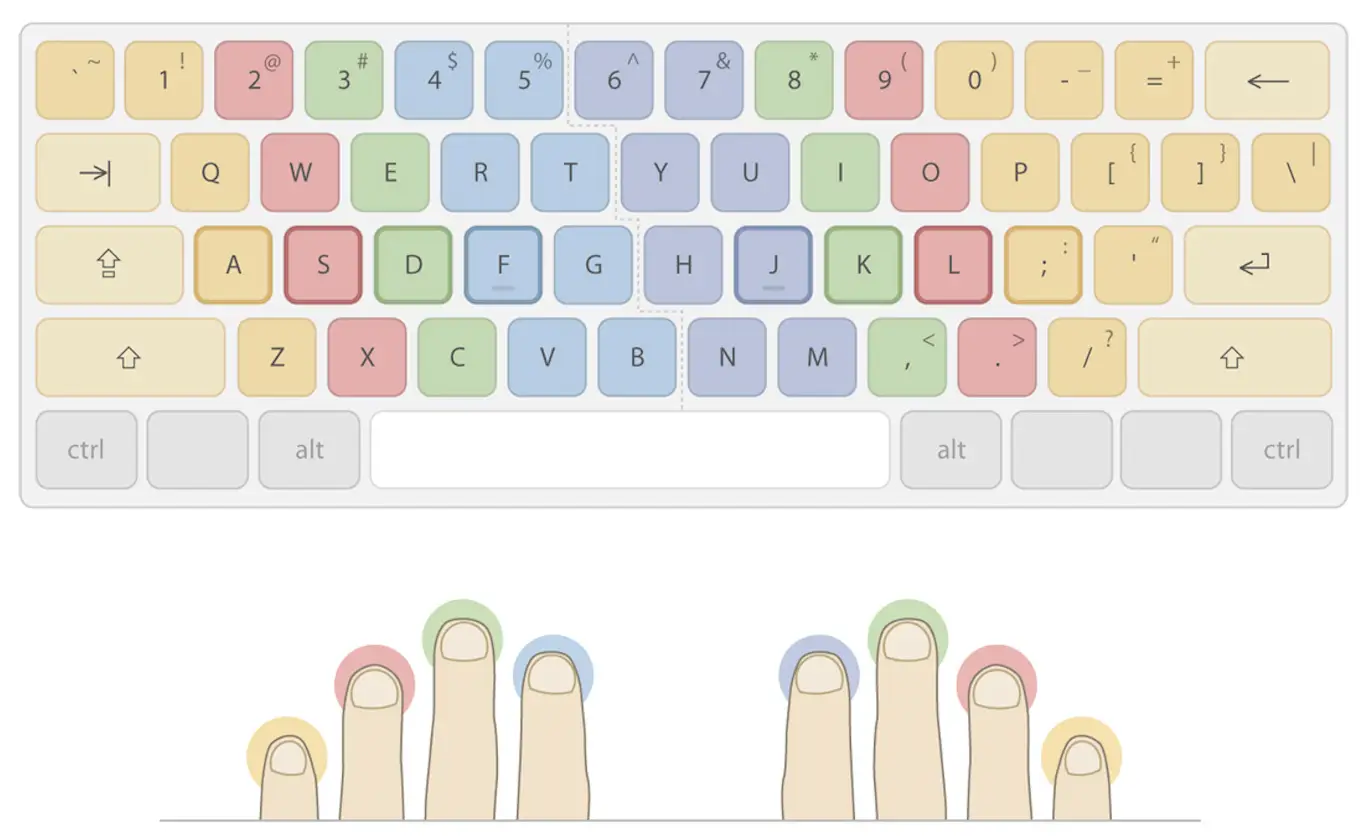
The core of touch typing is the “Home Row”—the middle row of letters (A, S, D, F and J, K, L, ;).
- The Anchors: If you look at your keyboard, the F and J keys usually have tiny raised bumps. These are tactile guides so your index fingers can find their place without you looking.
- From that home position, your fingers “reach” for other keys and immediately return to center.
- Because you aren’t hunting and pecking with two fingers, your brain can focus entirely on the content of what you’re writing rather than the mechanics of finding the letter “B.”
Understanding the theory is easy; the real challenge is retraining your brain to trust your fingers. To bridge the gap between ‘hunting and pecking’ and fluid motion, you need consistent, deliberate practice. I’ve vetted several ‘digital gyms’ that genuinely make a difference in building that muscle memory. These platforms are either open-source or ad-supported, which is a great for you—it means you get access to professional-grade training tools entirely for free, with only a few minor ads on the periphery of your screen.
The 3-Stage Path to Typing Mastery
Here are my recommendations:
Stage 1: Beginner (0–30 WPM)
Tool: TypingClub
Starts you on a single key and gradually builds to full sentences. Works great for learning touch typing from scratch.
Stage 2: Intermediate (30–60 WPM)
Tool: Typing Academy
Structured drills that build flow and rhythm. Unlike stat-focused sites, it has an actual learning curve to help you improve consistently.
Stage 3: Advanced (60+ WPM)
Tool: Type-Dojo
Clean, distraction-free practice for refining consistency and reaching elite speeds.
Just a quick heads-up: I don’t earn a single cent in commission or referral fees from any of these links. These are tools I’ve personally used and found effective; I’m sharing them purely to help you hit your typing goals faster.
The Practice Formula That Actually Works
Here’s the thing: 15 minutes a day beats 2-hour weekend cram sessions. Your brain builds muscle memory through repetition over time, not intensity. I know our days are full, but if you are serious about improving your typing speed, this is what you could do:
The Daily Routine:
- Warm up (3 min): Type a paragraph (could literally be anything, for example a block from this article) at 80% of your max speed. Focus on smooth, clean keystrokes.
- Targeted practice (10 min): Use the tool for your current stage. Focus on problem areas (for me, it was always double letters like “ll” or “ee”).
- Speed burst (2 min): One final push at your absolute max speed. Don’t worry about mistakes—just go.
Do this every day for a month, and I guarantee you’ll see measurable improvement. Your WPM will climb, but more importantly, typing will start to feel automatic.
One Last Thing: Ergonomics Matter More Than You Think
You can practice all you want, but if your setup is wrong, you’re working against yourself. Here’s the bare minimum:
- Wrists neutral, not bent. Your hands should float slightly above the keyboard, not rest on it.
- Elbows at 90 degrees. If your chair is too low or too high, you’re adding unnecessary strain.
- Screen at eye level. If you’re looking down, you’re compressing your neck. (Future you will thank you for this one.)
Ready to level up? Pick the tool that matches your current stage, commit to 15 minutes a day, and watch your speed climb. Your future self—flying through emails, reports, and code at 70+ WPM—will wonder why you didn’t start sooner.
I’m a new blogger on a mission to share what I learn. If you found this helpful (or have tips on how I can improve), please send your feedback to [email protected]. I read every message!